How to Check Image Metadata: A Beginner’s Guide
Every photo you take holds hidden details—like when, where, and how it was captured. This beginner’s guide shows you how to easily check image metadata using imagemetapro free online tool. Whether you're a photographer, blogger, or just curious, you'll learn how to uncover EXIF data, GPS info, editing history, and more—in just a few clicks. No tech skills needed!
Last updated on May 26, 2025
Table of Contents
In today’s digital world, images are everywhere. We snap them, share them, edit them, and upload them in seconds. But did you know that every image you take holds hidden data that tells a bigger story? This hidden information is called metadata, and learning how to view it is easier than you might think.
If you're new to image metadata or simply looking for a quick and secure way to check it, you're in the right place. This beginner’s guide will walk you through everything you need to know about viewing metadata hidden in your images—and show you how to use our free online tool to access it in just a few easy clicks.
How to Check Image Metadata – The Easy Way
There are many ways to check metadata, but the simplest option—especially if you're not tech-savvy—is to use an online tool. That’s where our free Image Metadata Tool comes in.
Step 1: Go to Our Free Image Metadata Tools
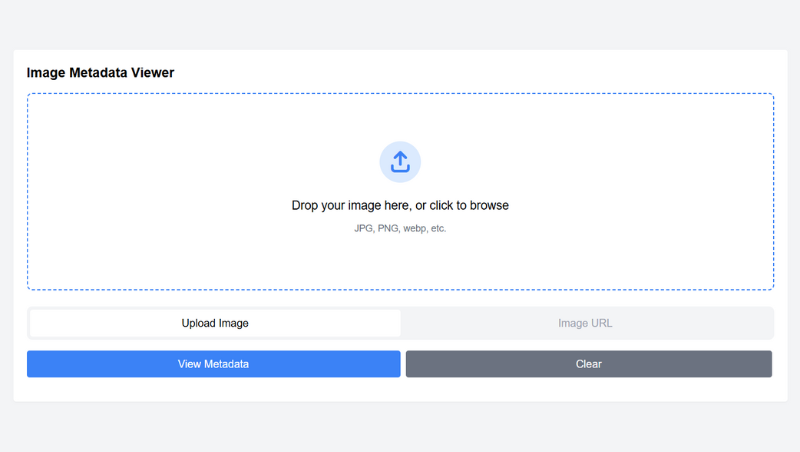
Start by visiting our free online tools. You’ll see a clean, simple interface designed for everyone—from beginners to tech-savvy users.
Step 2: Upload Your Image
Click the “Upload” button or drag and drop your image into the tool. You can upload photos from your computer, phone, or tablet.
Supported file types include JPG, PNG, GIF, and more.
Step 3: View the Metadata
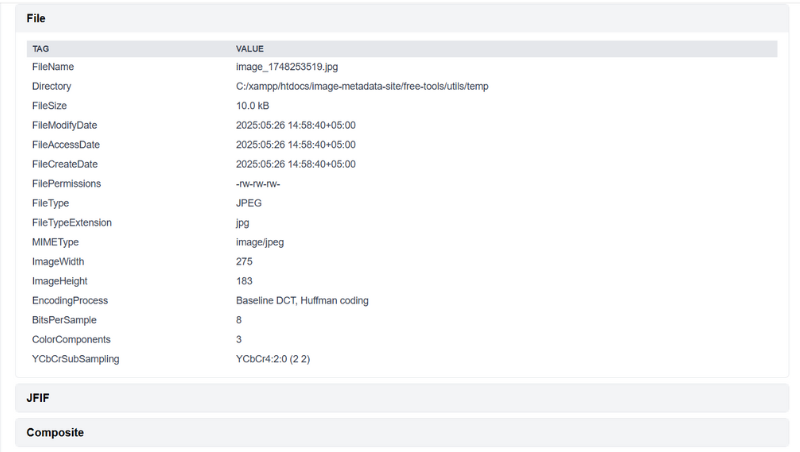
Once your image is uploaded, the tool will instantly display all available metadata.
You’ll see a detailed breakdown of key information, such as:
- EXIF data (camera settings, date/time, device model).
- GPS data (location if available).
- IPTC/XMP tags (description, author, copyright info).
- Software used (editing tools like Photoshop or Lightroom).
No waiting. No confusion—just clear, easy-to-understand results.
What Kind of Metadata Will You See?
Our image metadata tool reveals a wide range of data depending on what the image contains. Here’s what you might find:
- Basic Info: Image size, dimensions, file type, and creation date.
- Camera Data: Camera model, lens used, exposure settings, flash info.
- Location Info: Latitude and longitude (if GPS tagging was enabled).
- Editing Software: Names of apps or programs used to edit the photo.
- Author Details: Photographer’s name, copyright or usage rights.
Keep in mind that some platforms (like social media apps) remove metadata when you upload images. So if you downloaded a photo from Facebook or Instagram, the metadata may be stripped.
Who Can Benefit from Checking Image Metadata?
Everyone! Here’s how different users can benefit:
- Photographers can analyze camera settings and organize large image libraries.
- Bloggers can optimize SEO by checking alt text, captions, and tags.
- Journalists can verify when and where a photo was taken.
- Business owners can track branded content across platforms.
- Parents and everyday users can ensure private information isn’t unintentionally shared.

Image metadata may be hidden, but it’s incredibly useful. Whether you’re trying to understand how a photo was taken, want to protect your privacy, or just feel curious, checking image metadata gives you valuable insight—without needing any tech skills.
With our free, beginner-friendly tool, you can view image metadata anytime, from any device, in just a few clicks. So go ahead— upload an image using our free tool and unlock the story behind it. You might be surprised by what you find!