The Ultimate Guide to Removing Metadata from Images Safely
Protect your privacy by removing hidden data from your photos. With ImageMetaPro’s Metadata Remover Tool, you can instantly clean EXIF, IPTC, and XMP information to keep your images secure and share-ready.
Last updated on November 10, 2025
Table of Contents
Every image you capture holds more than just pixels—it carries invisible details known as metadata. This hidden information reveals when, where, and how your photo was taken, including your camera settings, GPS location, and even editing software details.
While metadata can be useful for photographers and designers, it can also expose sensitive personal data when shared online. That’s why learning how to remove image metadata safely has become essential for anyone who values privacy and security.
In this guide, we’ll explore why metadata matters, what risks it poses, and how you can clean image metadata online using the ImageMetaPro Metadata Remover Tool—a fast, secure, and free way to protect your privacy.
Why You Should Remove Image Metadata
When you post an image on social media, send it in an email, or upload it to a website, hidden data travels with it. That data can include:
- EXIF data: camera model, exposure, date/time, and location coordinates.
- IPTC/XMP data: author name, copyright info, and software used for editing.
If a photo contains GPS data, someone could trace the exact location where it was taken—your home, workplace, or a client’s private property.
In the wrong hands, these details can be misused. Hackers, marketers, and even data scrapers use metadata to track your online behavior or exploit sensitive information.
By using a metadata remover tool to clean this information, you protect yourself from privacy leaks, maintain control of your digital content, and ensure your shared images are safe.
What Image Metadata Actually Contains
To understand why you should delete it, it helps to know what metadata includes.
EXIF Data (Exchangeable Image File Format)
This automatically recorded data contains technical image details like shutter speed, aperture, ISO, and flash status. Smartphones also embed GPS coordinates here
IPTC Metadata
Used by photographers and media professionals, this stores descriptions, titles, keywords, and copyright notes.
XMP Metadata
Created by editing software such as Adobe Lightroom or Photoshop, this data holds image adjustments and editing history.
All this hidden information can easily be extracted using a metadata viewer—which is why removing it is a must before sharing your images online.
How to Remove Metadata from Images (Step-by-Step)
You don’t need to install expensive software or be tech-savvy to clean your images. The safest and fastest option is to remove image metadata online using the ImageMetaPro Metadata Remover.
Step 1: Visit the Metadata Remover Tool
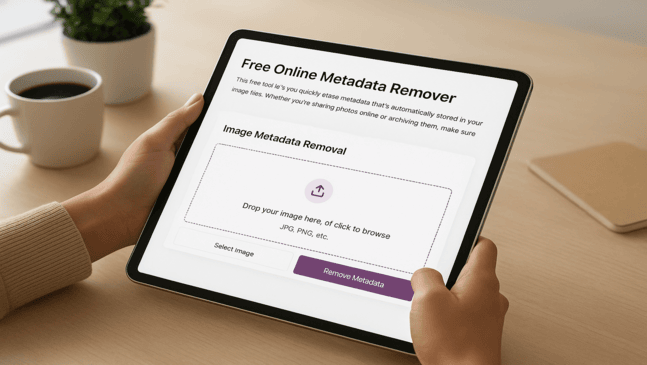
Go to the ImageMetaPro Metadata Remover page.The interface is clean and straightforward—no ads, no sign-ups.
Step 2: Upload Your Image
Click “Upload Image” or simply drag and drop your file. Supported formats include JPG, JPEG, PNG, WebP and GIF.
Step 3: Remove the Metadata
Once your image uploads, click “Remove Metadata.” The tool automatically strips all hidden EXIF, IPTC, and XMP data while keeping your photo’s visual quality intact.
Step 4: Download the Clean Image
Once the cleaning is complete, your metadata-free image will automatically download — no need to click any button.That’s it—your photo is now safe to share anywhere without exposing private information.
ImageMetaPro automatically deletes all uploaded images after 24 hours to ensure complete privacy and security.
Benefits of Cleaning Image Metadata
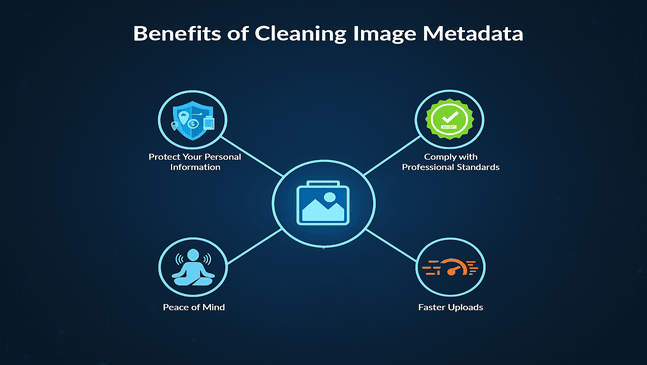
Using a trusted metadata remover offers multiple benefits beyond privacy protection:
Protect Your Personal Information
Prevent exposure of GPS data, time stamps, and device details that could identify you or your location.
Comply with Professional Standards
If you’re in media, photography, or marketing, removing metadata can help you comply with GDPR or client privacy policies.
Enhance File Security
Ensure no hidden tags or editing records leak through when transferring images between clients or collaborators.
Faster Uploads
Metadata doesn’t increase file size, but cleaning it removes unnecessary information and helps keep your storage organized and ensures smoother file handling across platforms.
Peace of Mind
Know that your files are safe from accidental data exposure every time you share them online.
Best Practices for Safe Image Sharing
Metadata removal is one step, but digital safety requires a few consistent habits too.
Here are expert tips for secure image sharing online:
- Always clean your images before uploading them to any social platform or website.
- Use online tools like ImageMetaPro instead of unverified apps or third-party software.
- Avoid re-saving images in apps that automatically add new metadata (some editors and phone apps do this).
- Rename your files safely. Avoid using personal names or project titles in filenames.
- Verify before reposting. If you re-edit an image, run it through the remover again to ensure no new data was added.
With these small habits, you can build long-term protection into your digital sharing workflow.
Who Should Use a Metadata Remover Tool
Everyone who uses images online can benefit, but it’s especially crucial for:
Photographers and Content Creators
Protect your work from unauthorized duplication or geographic tracing.
Business Owners
Ensure marketing or product photos don’t reveal internal details or client data.
Social Media Users
Remove location and device info from personal photos to avoid being tracked.
Journalists and Bloggers
Keep sensitive locations, time stamps, and editing details confidential.
Design Agencies and Developers
Safeguard client files, maintain data compliance, and deliver clean image assets.
In short, anyone who values digital privacy and professionalism should clean their image metadata regularly.
Why ImageMetaPro Is the Safest Way to Remove Metadata
ImageMetaPro only temporarily stores metadata-cleaned images, ensuring nothing is saved permanently.
That means:
- No data is stored or shared.
- The process is fast, secure, and 100% private.
You can also use ImageMetaPro to:
- View metadata before deleting it.
- Write or edit tags using the Metadata Writer.
- Use AI-based tools to generate optimized descriptions.
- Convert images to PDF while maintaining privacy and compression efficiency.
It’s a complete solution for creators who care about image data protection and smart file management.
Removing metadata from images might seem like a small step, but it plays a massive role in protecting your digital privacy. Whether you’re a photographer, marketer, or everyday social media user, taking control of what’s hidden in your images ensures safe, professional, and private sharing every time.
With ImageMetaPro Metadata Remover, you can delete EXIF data online, clean image metadata securely, and protect your privacy—all in a few clicks.